Conversion Rate Optimisation Audit: A Founder's Guide to Turning Clicks into Cash

Let's be blunt: a huge chunk of PPC campaigns are bleeding money. The culprit isn't always your ad copy or bidding strategy. It’s the broken bridge between the ad click and the actual conversion.
A conversion rate optimisation audit is how you find and fix those leaks. It's a deep, systematic dive into your entire user journey to pinpoint exactly where prospects are dropping off and, more importantly, why.
Stop burning cash and start auditing your funnel
If you're pouring money into Google Ads without a clear, audited path from click to customer, you're literally setting cash on fire. It's a surprisingly common mistake. We get so obsessed with clicks and impressions that we forget the only metric that actually pays the bills: the conversion.
A CRO audit isn’t some academic exercise in tweaking button colors for a 0.1% lift. Think of it as a forensic investigation of your sales process. The goal is to hunt down and eliminate every point of friction, anxiety, or confusion that stops a potential customer in their tracks.
This process gives you a repeatable system for improvement, not just a list of problems. You start by understanding the traffic, find the leaks, and then apply data-driven fixes.
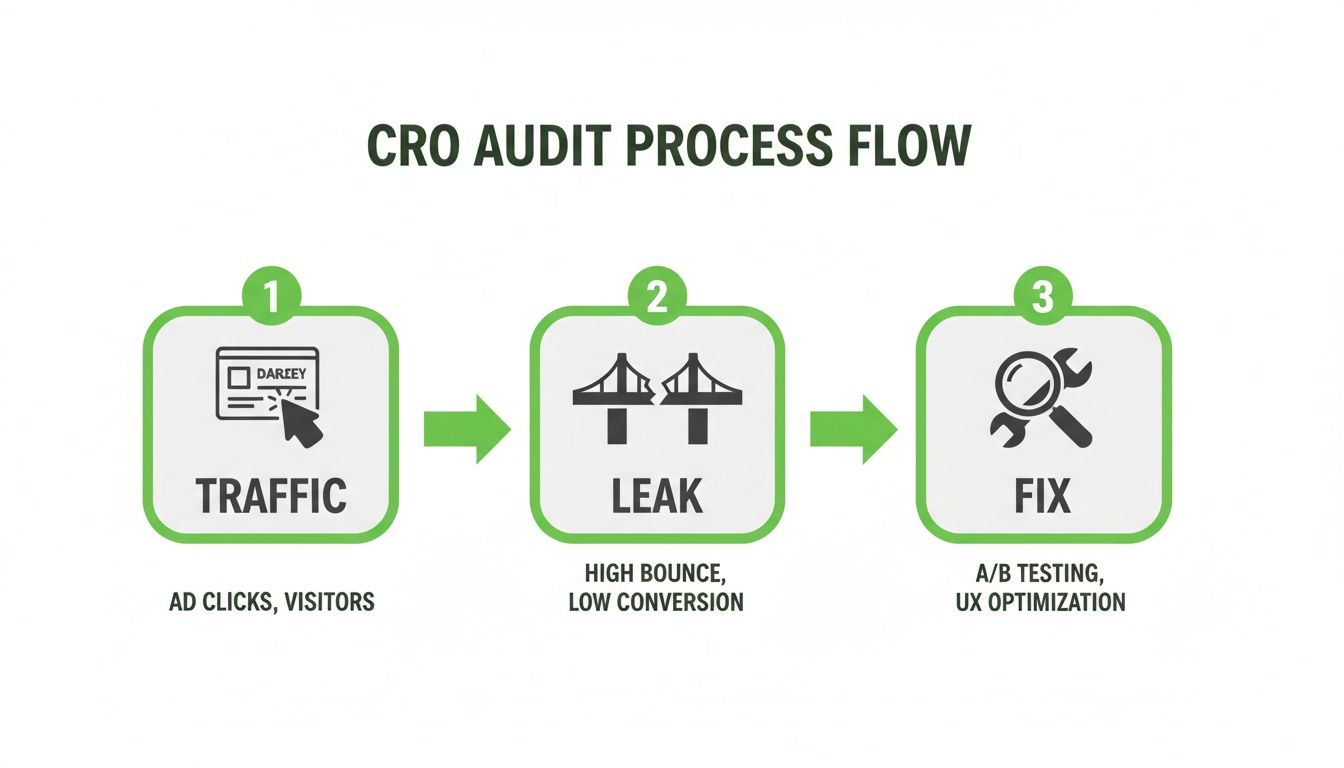
This isn't theory; it's a practical framework for founders, PPC managers, and agencies who need every single euro to count. No fluff, just what works. This audit gives you a concrete roadmap to higher ROAS by focusing on what happens after the click.
To really get this right, you need to understand the entire conversion optimization sales process. It frames the bigger picture of what we're trying to achieve.
Of course, none of this matters if your tracking is broken. Before you even think about starting an audit, you have to be confident your data is clean. If your conversion tracking is faulty, any analysis you do is completely useless. You'll end up making decisions based on bad data, which is far worse than making no decisions at all.
Before you dig into user behavior or page performance, you must verify your setup. Our guide on the correct Google Ads conversion tracking setup is a non-negotiable prerequisite to this entire process. Proper tracking is what allows you to connect ad spend directly to revenue. It’s how you turn your PPC campaigns from a cost center into a predictable profit engine.
Laying the groundwork for a bulletproof audit
Before you even think about analyzing a landing page or rage-clicking a broken form, you need to get your house in order. So many founders jump straight to the sexy parts of CRO—the big design changes, the clever copy tweaks. But a winning conversion rate optimisation audit is built on a foundation of clean, reliable data.
Frankly, it's the unsexy work that separates winning campaigns from the ones that fizzle out. If your analytics setup is a mess, any audit you perform is just an educated guess. You might as well be navigating with a hand-drawn map. 🗺️

Nail down your data integrity first
First things first: make sure your core platforms are talking to each other flawlessly. I'm talking about Google Analytics (GA4), Google Tag Manager (GTM), and your Google Ads account. They need to be perfectly synced.
A broken connection here is like having a translator who only knows half the language. You're going to get some very wrong messages.
Check your conversion goals. Are they tracking what actually matters to the business? Sure, a Contact Us form submission is fine, but a Demo Booked event is infinitely more valuable. You need to be tracking both.
This is also where you need to look beyond the final sale and start tracking micro-conversions. These are the small, yet crucial, steps users take on their journey.
- Newsletter Signups: This shows interest and gives you a direct line to nurture a potential lead.
- Case Study Downloads: A huge indicator of a user deep in the research phase, seriously evaluating your solution.
- Video Plays (75%+ completion): Someone watching most of your demo video is a red-hot, highly engaged prospect.
Tracking these smaller commitments tells you where users are showing intent, even if they aren't ready to pull out their credit card just yet. It paints a much richer picture of what’s really happening.
Get your qualitative tools fired up
Quantitative data from analytics tells you what is happening. Qualitative tools tell you why. You absolutely need both.
This means getting tools like Hotjar or Microsoft Clarity set up and collecting data immediately. Don't wait until you're ready to start the audit. These tools need time to gather enough session data to be useful.
You need to see where people are getting stuck, what they're clicking on (or ignoring), and how far they scroll before giving up. Trust me, watching a single session recording of a frustrated user rage-clicking your broken checkout button is a more powerful motivator than any spreadsheet.
Data-driven decision-making is non-negotiable for conversion success, yet many businesses still operate without solid analytics. Every decision should be rooted in user behavior insights. Paid search conversion rates average a slim 1.2% for B2C and 1.5% for B2B, underscoring the critical importance of post-click optimization. Read more about the latest conversion rate optimization benchmarks.
Map the entire user funnel
Finally, with your tools in place, map out the entire user funnel. I don’t mean a vague idea in your head. I mean a literal diagram—on a whiteboard, in Miro, wherever—of every single step a user takes from ad to thank you page.
Start from the ad impression. What does the ad promise? What happens when they click? What’s the headline on the landing page? What fields are in the form? What does the thank you page say? And what happens next?
This map becomes your battle plan. Each step is a potential point of failure. Once you have this visual, you can start overlaying your analytics data onto it.
Where are the biggest drop-offs? This is how you pinpoint the highest-priority areas for your audit. Without this map, you're just wandering in the dark.
Decoding user behavior with analytics
Alright, you've got your tools hooked up and data is flowing. Now it's time to put on your detective hat.
This is where the real conversion audit begins. We stop guessing and start listening to the story our users are telling us through their clicks. The goal is to dig into Google Analytics and find the hard, quantitative ‘what’ before we start exploring the qualitative ‘why’.
Forget vanity metrics like bounce rate. Honestly, it’s a mostly useless number. We’re hunting for meaningful patterns, and that means slicing up the data. Your users aren't one big monolith; they're a mix of different groups with wildly different behaviors.
Segmenting to find your best customers
First things first, segment your audience. You need to know which pockets of traffic are actually performing and which are just burning your cash.
- Device Segmentation: Are mobile users converting at a fraction of the rate of your desktop visitors? That’s a massive red flag pointing to a clunky mobile experience.
- Channel & Source/Medium: Is your paid search traffic converting better than organic? This helps you understand user intent and tells you where to double down with your budget.
- Campaign & Ad Group: Time to get granular. Which specific Google Ads campaign is driving high-value conversions, and which one is just attracting window shoppers?
Looking at these segments often reveals some uncomfortable truths. You might discover that awesome campaign you love is actually a dud, or that a neglected channel is a hidden goldmine. This data doesn't have an ego; it's your ground truth.
Pinpointing the leaks in your funnel
Once you know who to look at, you need to find out where they're bailing. This is where funnel visualizations in GA4 become your best friend.
By mapping out the key steps a user has to take—from landing page to form submission to thank you page—you can see the exact drop-off points in stark numbers.
Is there a 40% drop-off between viewing the pricing page and starting the checkout? That's your primary target. Is almost everyone abandoning the cart when you ask for shipping details? The friction there is killing your sales. These funnels give you a giant, flashing sign pointing directly at the biggest problems.
Here’s a little context to help you gauge your own numbers. Conversion rates can be all over the map, but having some benchmarks helps you know if you're dealing with a small leak or a five-alarm fire.
PPC channel performance benchmarks
| Metric | Direct Traffic | Search Traffic | Desktop Device | Mobile Device |
|---|---|---|---|---|
| Average Conversion Rate | 2.5% - 4.5% | 3.0% - 5.0% | 3.9% | 1.8% |
| E-commerce Add-to-Cart | 9% - 11% | 8% - 10% | 10.5% | 7.5% |
| Lead Gen Form Submit | 3% - 6% | 4% - 7% | 5.5% | 2.5% |
Keep in mind these are just averages. Your industry, offer, and audience will all play a huge role. The key is to compare your performance against these benchmarks to spot obvious areas for improvement.
The global e-commerce landscape shows just how much conversion rates can vary, with an average sitting between 2% and 4%. Personal Care products can hit a 6.8% conversion rate, while desktop traffic at 3.9% crushes mobile's 1.8%. Knowing these benchmarks helps you understand if your drop-off rates are normal or a sign of a major issue. Discover more insights about these e-commerce benchmarks and trends on speedcommerce.com.
The Behavior Flow reports in Google Analytics can also be incredibly insightful, though they often look like a chaotic plate of spaghetti at first. Don't get overwhelmed. Look for the big, thick red lines showing where large groups of users are exiting your site. This view complements your funnel analysis by showing you the non-linear, messy paths people take before they give up.
Of course, none of this works without proper event tracking, which is why a solid Google Tag Manager setup is non-negotiable. If you need a refresher, check out our guide on how to use Google Tag Manager effectively.
This quantitative analysis is the foundation of your entire audit. It removes ego and opinion from the equation and replaces it with cold, hard data. It tells you exactly where the leaks are. Next, we'll figure out why they're happening.
Getting human: the UX and heuristic analysis
Okay, your analytics have given you the hard numbers. You know what is happening and where people are dropping off.
Now for the part where the real breakthroughs happen: figuring out why.
Data alone is a dead end. It can't tell you about the flicker of doubt or the outright frustration that makes someone hit the back button. This is where we stop being data analysts and start being human. It’s time to walk in your customer’s shoes and experience your landing page exactly as they do. This is less about spreadsheets and more about empathy.

Nail the first impression: the 5-second test & message match
Let's be brutally honest. The moment someone clicks your ad, a stopwatch starts ticking. You have about five seconds to answer their silent, critical questions: Where am I? What can I do here? And why should I even bother?
If your value proposition isn't blindingly obvious in that tiny window, you've probably already lost.
Does the headline on your landing page perfectly mirror the promise you made in your ad? This is message match, and it's non-negotiable. Any disconnect, however small, is jarring. It feels like a bait-and-switch, and it vaporizes trust instantly. Their next click will be away from you.
Getting this right is foundational. For a much deeper look, our guide on landing page design best practices is a great place to start.
Hunting for friction, anxiety, and distraction
Next up, we’re going on a safari through your conversion path, hunting for the three silent conversion killers.
- Friction: These are the dumb, unnecessary hoops you make people jump through. A classic example? Asking for a phone number on a top-of-funnel ebook download. That's massive friction. Another is a form with 15 fields when you only need three. Simplify. Be ruthless.
- Anxiety: This is that nervous feeling in a user's gut that stops them from committing. Is your checkout page secure? Do you have trust signals like customer testimonials or security badges? A lack of social proof or a sketchy-looking payment form screams run away.
- Distraction: Is your call-to-action (CTA) button the most obvious thing on the page? Or is it lost in a sea of competing links and pop-ups? Your job is to guide the user's eye to the one action that matters.
The best user experiences are invisible. They just get out of the way and help people achieve their goal. Your aim should be to make the desired action feel like the most natural, obvious next step. If you have to explain it, you’ve already failed.
Watch real people use your site: session replays & heatmaps
Now it's time to validate our hunches by watching real users in the wild. This is where you fire up those Hotjar or Microsoft Clarity recordings you've been collecting.
Be warned: watching people interact with your site is humbling, enlightening, and sometimes painful. 😬
You'll see them get stuck. You'll see them rage-click on images that aren't buttons. You'll watch them abandon your beautiful form one field away from completion. Heatmaps will show you, in aggregate, what parts of your page get all the love and which sections are completely ignored.
This isn't about watching one or two videos; it's about spotting patterns.
Are 70% of your mobile visitors trying to click your logo instead of the CTA button? That’s not a user problem; that’s a design problem. Are people scrolling right past your key benefits? Your copy isn't doing its job.
This qualitative deep dive gives you the why behind the what you found in your analytics. These human stories are the fuel for your most powerful A/B test ideas. You stop guessing what might work and start knowing what’s broken—and having a damn good idea of how to fix it.
Performing technical audits and integrity checks
Alright, let's get into the silent killer of conversions: technical debt.
You can have the most persuasive copy in the world and a design that belongs in a museum. But if your site is slow, broken on mobile, or your tracking is a mess, you're just lighting money on fire.
This part of the audit is completely non-negotiable. It’s the foundational check that ensures all your other hard work actually has a chance to pay off. Think of it like checking the engine and tires before a long road trip—skipping it is just asking for a breakdown somewhere down the line.
Speed isn't a feature; it's a prerequisite
Let’s get one thing straight: page speed isn't just a nice-to-have for SEO anymore. It's a core, non-negotiable part of the user experience.
If your landing page takes more than three seconds to load, you're losing a massive chunk of your audience before they even see your headline. We're talking about users hitting the back button faster than you can say bounce rate. Data consistently shows that even a one-second delay can slash conversions by 7%.
To get a proper diagnosis, lean on tools like Google PageSpeed Insights. The great thing is they don’t just tell you you're slow. They give you a concrete hit list of what’s bogging you down.
- Bloated Images: Are you serving a 5MB hero image to a mobile user? That’s an unforced error, and it's costing you customers.
- Messy Code: Unused JavaScript or bloated CSS files are often the biggest culprits. They block the page from rendering and make the user stare at a blank white screen.
- Server Response Time: Sometimes the problem isn't your page, it's your hosting. If your server takes an eternity to respond, it's time for a serious chat with your provider.
Fixing these isn't always a quick win, but it's always worth it. Shaving even half a second off your load time can deliver a measurable lift to your bottom line.
Your site has to work everywhere, every time
Next up: we need to smash the illusion that everyone sees your website exactly as you do on your 27-inch monitor running the latest version of Chrome. The reality is a chaotic mix of devices, browsers, and screen sizes.
You have to check for cross-browser and cross-device compatibility. It's tedious, but it's absolutely critical.
Does your lead form completely break on Safari for iOS? Does the layout collapse into a jumbled mess on an older Android device? These are guaranteed conversion killers.
One small technical error can invalidate all your other efforts. You can spend weeks crafting the perfect offer, but if the Buy Now button is off-screen on a specific device, none of that matters.
Your quantitative data from the analytics review should give you a starting point. If you noticed an unusually low conversion rate from Firefox users, for example, that's exactly where you start poking around. Use browser developer tools and services like BrowserStack to simulate different environments.
As part of this, it's also crucial to evaluate the security and compliance of your payment systems. A user who feels their data is at risk will never convert. For a solid baseline, check out a practical guide to PCI DSS requirements to make sure you're handling sensitive information correctly.
Is this thing on? verifying your tracking
Finally, and most critically, we need to verify the integrity of your tracking setup. If your tracking is broken, your entire audit is built on a foundation of lies. You're flying completely blind, and any A/B test you run will be completely useless.
Use the Google Tag Assistant extension and your browser's developer tools to watch your tags fire in real-time. Go through your entire funnel just like a user would.
- Land on the page. Does the pageview tag fire correctly?
- Fill out the form. Does your lead submission event trigger?
- Reach the thank you page. Does the main conversion pixel fire with the correct value?
You need to see that green checkmark on every single step. A broken tag means you aren't collecting data, which makes any real optimization impossible. This isn't just a box to tick; it's the bedrock of any data-driven growth strategy.
Building your A/B testing roadmap from audit findings
Alright, let's be candid. A detailed audit is completely useless if it just ends up in a forgotten folder on your Google Drive. An audit without an action plan is just a document that gathers digital dust.
The final, critical step is turning all those juicy findings into a structured A/B testing roadmap.
This isn’t a random wishlist of ideas you think might be cool. It's a prioritized battle plan based on everything you've just uncovered. It’s how you transform a reactive fix-it exercise into a proactive, continuous optimization engine. You stop chasing one-off wins and start building compounding gains.
Prioritizing your hypotheses
Not all ideas are created equal. Trying to test everything at once is a recipe for chaos and inconclusive results. You need a simple, no-nonsense framework to score and rank your test hypotheses.
A popular one I keep coming back to is the P.I.E. framework. It's dead simple and forces you to think critically about where to focus your energy first. You score each idea from 1 to 10 on three criteria:
- Potential: How much of an improvement can we realistically expect? Fixing a broken checkout button has massive potential.
- Importance: How valuable is the traffic on the pages you’re testing? Optimizing your highest-intent pricing page is far more important than tweaking your About Us section.
- Ease: How difficult is this to implement, technically and operationally? Changing a headline is easy (a 10). A full site redesign is a nightmare (a 1 or 2).
An idea like ‘Clarifying the headline to match ad copy’ might score a 9 in Potential, an 8 in Importance, and a 10 in Ease. That’s a high-priority test. Conversely, ‘Rebuilding the entire lead funnel with a new CRM’ scores low on Ease and goes to the bottom of the list, even if its potential is high.
Constructing the roadmap document
Once scored, you lay this out in a simple spreadsheet. Your roadmap needs to be a living document, not a stone tablet. For each test idea, you should outline the core components clearly.
This structure keeps you honest and focused. It ensures every test is tied to a specific business goal and a clear hypothesis derived from your audit data. This approach is fundamental whether you're running simple A/B tests or exploring more complex scenarios. Understanding the differences between multivariate testing vs A/B testing will help you choose the right method for the job.
This roadmap is your future. It’s what turns insight into impact, week after week.
Your top CRO audit questions, answered
I get asked a lot about the nitty-gritty of running a conversion rate optimisation audit. It’s one of those things that sounds way more complicated than it is, but once you’ve been in the trenches a few times, you start to see the patterns.
Let's clear up some of the most common questions I hear from other founders and PPC managers.
How often should I run a full audit?
Honestly, for a high-traffic site or an active PPC campaign where you’re spending serious cash, a deep-dive every quarter is a solid rhythm. It keeps you sharp and ensures you’re not letting new conversion blockers fester.
For smaller businesses or sites with less traffic, a bi-annual or even annual audit is perfectly fine.
The real key, though, is continuous monitoring. You should be glancing at your core funnel metrics weekly. The moment you see a sudden, unexplained drop in your conversion rate, that’s your trigger. Don’t wait for the next scheduled audit; run an immediate mini-audit to diagnose the problem. Time is money, literally.
What are the most common problems you find?
It’s almost comical how often the same basic issues pop up. After doing this for years, you just know what to look for. If you're starting an audit, I’d bet my morning coffee you'll find at least one of these. ☕
- Weak Value Proposition: The landing page fails to answer What’s in it for me? within five seconds. It’s either vague, full of jargon, or just plain boring.
- Message Mismatch: The ad promises one thing, but the landing page talks about something else entirely. This is an instant trust-killer and a massive waste of ad spend.
- Form Friction: The form is just too greedy. Asking for a phone number and company size just to download a simple PDF is a rookie move that tanks conversions.
- Mobile Experience is an Afterthought: The page is painfully slow to load on a 4G connection, or the buttons are too small to tap. It's 2024; this is just inexcusable.
- Zero Trust Signals: No reviews, no testimonials, no security badges. People are rightfully skeptical online; you have to give them a reason to believe you.
Can I do this myself, or do I need an agency?
You can absolutely do this yourself.
If you're a founder or a PPC manager who lives and breathes the business, you have a unique advantage. The tools are more accessible than ever, and the principles we’ve discussed are not rocket science.
The single biggest challenge is your own bias. You're too close to the project, and you see the page how you think it works, not how a confused, first-time visitor sees it. This is where an external consultant or agency brings that fresh, unbiased perspective, which is incredibly valuable.
That said, starting with a self-audit using a structured framework is the best first step you can take. You’ll learn a ton and fix the most obvious problems before ever needing to spend a euro on outside help.
Ready to stop guessing and start building high-intent landing pages that actually convert? At dynares, we use AI to create thousands of perfectly matched ads and landing pages for your Google Ads campaigns, driving higher Quality Scores and more revenue. See how it works at dynares.ai.