
Landing Page Personalization: The No-BS PPC Guide
Landing Page Personalization: The No-BS PPC Guide
Most advice on landing page personalization is too soft.
It treats personalization like a nice UX extra. Swap a headline, test a button color, maybe insert a city name, then call it innovation. For PPC teams, that's nonsense.
If you're buying traffic on Google Ads and sending everyone to one generic page, you're not running a serious acquisition system. You're paying for intent and then throwing that intent away on arrival. That’s not a creative problem. It’s an operations problem.
Stop treating every visitor the same
A one-size-fits-all landing page is lazy. I’m not saying that to be provocative. I’m saying it because paid traffic is expensive, intent is fragile, and generic pages break the ad-to-page conversation the second the click happens.

If someone searches for a very specific problem, clicks a very specific ad, and lands on a page written for “everyone,” you’ve just created friction where there should’ve been clarity. That friction shows up in the only language PPC people care about. Lower conversion rates. Worse lead quality. More wasted spend.
Generic pages are a relic
The old excuse was technical complexity. Building lots of pages used to be painful. Data was messy, templates were brittle, and marketers needed developers for every tiny change.
That excuse is gone.
You can now build landing page personalization around keyword intent, geography, campaign source, and visitor context without needing a giant team. So keeping one bland page alive for every ad group isn’t simplicity. It’s avoidance.
Practical rule: If the ad is specific and the page is generic, the page is the problem.
Paid search punishes irrelevance
Google Ads is built on relevance. Users expect it. Google rewards it. Your budget depends on it.
The brutal truth is simple. You’re not just buying clicks. You’re buying moments of intent. Those moments don’t last long. A page has seconds to confirm, “Yes, you’re in the right place.”
Here’s the shift I’d make immediately:
- Stop building pages by campaign theme. Build them by search intent. “Plumber” and “emergency plumber near me” are not the same visit.
- Stop optimizing for internal convenience. Your account structure might be tidy while your visitor experience is a mess.
- Stop treating page relevance like design polish. It’s a core performance lever tied to efficiency, not aesthetics.
- Stop waiting for perfect data. The keyword alone is enough to start making the page smarter.
Many organizations don’t need more traffic. They need to stop mishandling the traffic they already paid for.
What landing page personalization actually means
Landing page personalization is just relevance in action.
Not creepy tracking. Not black-box wizardry. Not some overengineered martech ritual where ten tools pass data around and nobody knows why the page changed.
It means the page adapts to the context of the visit.
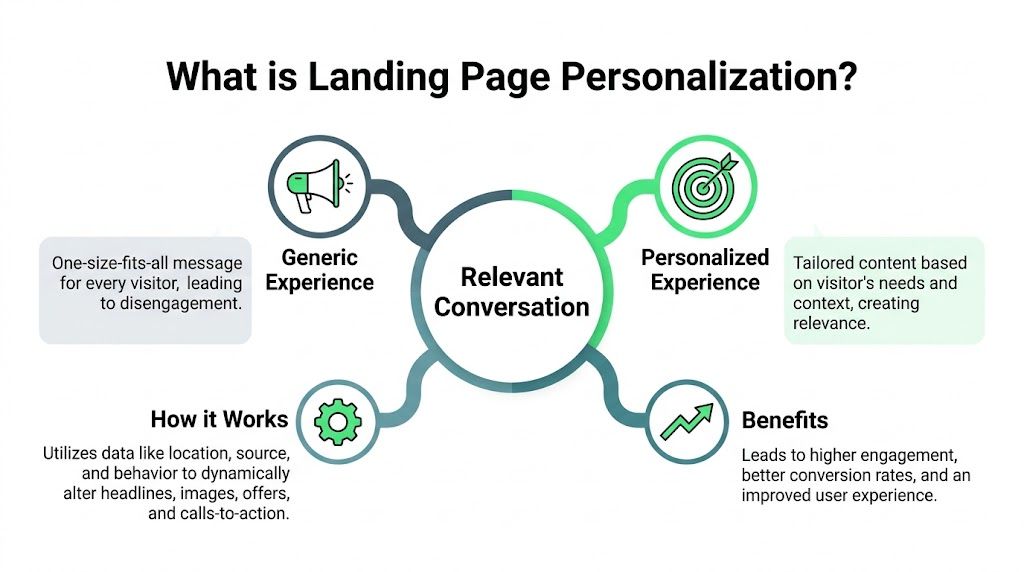
A good salesperson does this naturally. Someone walks in and asks for a specific solution. The good salesperson responds to that need. The bored one repeats the same script to everyone. Guess who closes more deals.
Relevance beats cleverness
If the ad says “Emergency plumber in London,” the landing page should continue that conversation. It should not pivot into vague brand fluff like “Trusted plumbing solutions for modern homes.” That kind of copy makes marketers feel smart and users feel lost.
The core job of landing page personalization is to make the visitor think, “This is exactly what I was looking for.”
That can happen through:
- Headline matching: reflect the keyword, service, problem, or offer
- Offer alignment: show the CTA or form that fits the search intent
- Contextual proof: swap testimonials, logos, or examples based on audience fit
- Location or segment cues: adapt copy for city, region, industry, or company type
One useful mental model comes from display advertising. If you want a quick parallel, dynamic ads are personalized advertisements, and landing pages should follow the same logic. The ad gets the click. The page has to keep the promise.
It’s broader than text swaps
A lot of people reduce landing page personalization to dynamic text replacement. That’s part of it, but it’s not the whole game.
Here’s a simple way to think about it:
| Personalization type | What changes | Best use case |
|---|---|---|
| Message match | Headline, subhead, CTA copy | Search campaigns with clear keyword intent |
| Audience fit | Proof, benefits, visuals | B2B pages split by industry or role |
| Geographic relevance | City, region, service availability | Local lead gen and multi-market campaigns |
| Intent shaping | Layout, section order, offer type | Different buyer stages and competitor terms |
The best personalized page doesn’t feel personalized. It just feels right.
That’s why I’m opinionated about this. Done well, landing page personalization doesn’t look flashy. It removes confusion. It shortens the distance between click and action.
And for PPC, that’s the whole job.
Why this is critical for Google Ads performance
If you run Google Ads, relevance is not a branding concept. It’s an economic one.
Most landing page advice ignores this and stays stuck in CRO-land. More clarity. Better UX. Stronger engagement. Fine. True. But PPC managers don’t get paid for “better engagement.” They get judged on CPC, conversion rate, lead quality, and ROAS.
That’s why landing page personalization matters.
It directly affects the math
When the page matches the keyword and ad intent, Google sees a better landing page experience. That can support stronger Quality Scores, and stronger Quality Scores make your media spend work harder.
Mismatch is expensive. According to HubSpot’s cited benchmarks, well-executed personalization can reduce CPC by 20-30% and boost Quality Scores by aligning page content with keyword intent, while 70% of PPC teams waste an estimated 40% of ad spend on mismatched landing pages (HubSpot).
That’s the part many organizations underestimate. They obsess over bid strategies and audience layers while sending expensive traffic to pages that barely acknowledge what the visitor searched for.
This is where ROAS actually moves
Lower CPC alone is nice. Better conversion rate alone is also nice. But when both happen together, the effect compounds.
You pay less for the click. More of those clicks convert. ROAS improves without needing the account to “scale” through brute-force budget increases.
That’s why I’d treat landing page personalization as a media efficiency project, not a design project.
For a deeper look at the mechanics behind message match and performance, this guide on Google Ads landing page optimization is worth reviewing alongside your account structure.
What this changes in practice
Most PPC waste comes from broken continuity between keyword, ad, and page.
Here’s what I’d fix first:
- High-intent non-brand terms: These deserve the tightest message match because the click is expensive and the visitor already told you what they want.
- Competitor campaigns: Generic pages usually flop here. These users need comparison-specific messaging, not homepage-lite copy.
- Local service campaigns: City-level or regional relevance matters fast. If the page feels broad, trust drops.
- Mixed ad groups: If multiple intents hit one page, split them. Convenience inside Google Ads is not a valid excuse for irrelevance after the click.
If your CPC is rising, don’t just blame the auction. Check whether your page still deserves the click.
This is the bit many teams resist because it creates work. Fair enough. But refusing to personalize landing pages while complaining about CPC inflation is like leaking fuel and arguing about petrol prices.
The mechanics of personalization that work
Personalization isn’t magic. It’s logic plus inputs.
It's often made to sound more complex than it is, usually because the tooling got ahead of the strategy. Start with the signals you already control. Then decide what on the page should change when those signals appear.

Start with the inputs
For paid search, the simplest input is often the most valuable. The keyword.
If the visit comes from Google Ads, URL parameters can carry keyword, campaign, and ad group context straight to the page. That gives you enough to tailor a headline, subhead, CTA, or supporting copy without waiting for some mythical “360-degree customer view.”
Then you can layer in additional signals:
- Geographic data for city, region, or country-based relevance
- Firmographic clues for B2B traffic when company or industry context is available
- Behavioral context for returning visitors or repeat page views
- Device context when layout or CTA emphasis should differ by screen type
The mistake is trying to use everything at once. Don’t. If your keyword logic is weak, adding more data just makes the wrong experience more complicated.
Then define what actually changes
The highest-value page elements are usually obvious. They’re the things people see first and trust first.
I’d prioritize these:
| Element | Why it matters | Example of useful personalization |
|---|---|---|
| Headline | Confirms message match instantly | Reflect the keyword or problem statement |
| Subheadline | Adds context and specificity | Mention service area, use case, or audience |
| Social proof | Builds trust faster | Show testimonials from a relevant industry or local market |
| CTA | Turns relevance into action | Change offer by intent, such as quote vs demo |
| Section order | Reduces friction | Lead with pricing, proof, or comparison based on query intent |
A lot of teams obsess over changing background images while leaving the core offer untouched. That’s backwards. Personalize the buying logic first. Cosmetics come later.
Field note: If you can only personalize one thing this week, personalize the headline. It carries more weight than most teams admit.
Dynamic text replacement is useful, but limited
Dynamic text replacement is the gateway drug of landing page personalization. It’s useful because it’s easy. Pass a keyword, insert it into the headline, and improve message match.
That’s a good start. It is not a full strategy.
Keyword insertion works best when paired with rules about intent. A user searching “CRM for real estate” shouldn’t just see that phrase echoed back. They should also see proof, benefits, and a CTA that make sense for that vertical.
If you want the tactical side of passing search terms into pages, this explainer on dynamic keyword insertion in Google Ads covers the mechanics clearly.
Rules beat chaos
The cleanest personalization systems use templates plus logic.
One template. Defined dynamic zones. Clear rules.
For example:
- If keyword contains local service intent, change headline and local proof block
- If campaign targets competitor alternatives, show comparison section first
- If visitor fits a B2B segment, swap in industry-specific testimonials
- If traffic is low intent, simplify the page and use a softer CTA
That’s not complicated. It’s disciplined.
The worst setup is the opposite. Random page clones, custom edits everywhere, no naming system, no rule hierarchy, and no one knows which variant maps to which traffic source. That’s how teams create personalization theatre instead of performance.
Putting it all together a practical implementation plan
Teams often fail because they try to personalize everything in one go. That’s dumb. You don’t need a giant rollout. You need a controlled system that targets the traffic most worth fixing first.
Start with the money terms
Go into your Google Ads account and identify the keyword groups driving the most valuable lead flow. Not every click deserves equal engineering effort.
Focus first on search terms that combine clear intent with meaningful spend. If a query is expensive, commercially relevant, and already producing conversions, it should not land on a generic page.
Your first pass should answer one question for each cluster: what does this visitor want right now?
That sounds obvious, but most accounts never do the work. They organize campaigns around internal labels, then expect users to tolerate vague landing pages.
Build one flexible template
You do not need hundreds of custom-designed pages on day one. You need one strong master template with defined dynamic zones.
Those zones should include the parts that influence trust and action earliest:
- Hero messaging: headline and subheadline tied to query intent
- Proof block: testimonials, trust markers, or examples matched to audience context
- Primary CTA: offer type aligned with buyer readiness
- Support sections: modular blocks that can change order based on intent
This is the bit agencies and lean teams often miss. Scale comes from structure, not from cloning pages manually until your system collapses under its own mess.
Pass intent into the page
Set your Google Ads URLs so the page receives useful context through parameters. The keyword is the obvious one. Campaign and ad group context can also help.
Then connect those values to your template logic. That can be done in different ways depending on your stack.
Some teams use VWO or Optimizely for controlled experiments. Others build custom rules in their CMS. Platforms built for high-volume paid search can automate page generation from keyword sets and approved templates. One example is dynares, which generates keyword-matched landing pages, ads, and forms from brand guidelines and campaign inputs.
If you’re still in the testing phase, pair your personalization work with a disciplined experimentation workflow. This guide on split testing landing pages is useful because it keeps the focus on what to test first instead of turning every launch into chaos.
Prioritize the CTA before the fancy stuff
To be blunt, if your CTA is generic, your page is underperforming.
According to Genesys Growth, personalized CTAs deliver a 202% better conversion rate than generic CTAs, broader AI-powered personalization strategies increase overall conversions by 40%, and 80% of consumers are more likely to buy when a brand offers personalized experiences (Genesys Growth).
That means your CTA is not a design detail. It’s one of the biggest levers on the page.
A few examples:
- High-intent local service term: use a direct action like booking or requesting a quote
- Comparison keyword: offer a side-by-side evaluation or alternative-specific proof
- Mid-funnel B2B term: shift toward demo, pricing, or customized consultation
- Early research query: use a lower-friction CTA instead of forcing a sales action too early
If you want more ideas around the broader discipline of improving website conversion rates, that resource is useful because it focuses on reducing friction instead of dressing up weak offers.
Measure by rule, not just by page
This is the step too many teams skip.
Don’t just compare “personalized page” versus “non-personalized page” at a top-line level. Break results out by the rule that triggered the experience. Which keyword clusters improved? Which CTA variants worked? Which audience segments got better lead quality?
If you don’t measure at the rule level, you won’t know whether your gains came from actual personalization or from random traffic shifts.
Good implementation is boring. Clean rules, good tracking, obvious message match, and ruthless measurement.
That’s what works.
Scaling personalization and avoiding the common traps
Going from a handful of variants to a real high-volume system is where organizations often encounter major difficulties.
They start with good intentions, then build a spreadsheet graveyard of page clones, edge-case rules, half-maintained templates, and QA debt nobody wants to touch. The result is predictable. The system becomes so fragile that the team retreats back to generic pages.

Scale through systems, not heroics
If your personalization process depends on manual design work for every keyword cluster, it will break. Not maybe. It will.
The fix is boring and effective. Standardize templates. Modularize sections. Use rule-based logic. Keep a small number of high-impact elements dynamic and lock down the rest.
According to Convert Lab, strategically optimized landing pages can achieve conversion rates of 5.31% or higher, and businesses with 21 to 40 landing pages see a nearly 300% increase in conversions compared to those with fewer pages (Convert Lab).
That matters because it validates scale itself. More relevant pages are not operational clutter when they’re built from a system. They’re a performance asset.
The traps that waste time
Most personalization mistakes come from excess.
Not too little ambition. Too much random ambition.
- Over-personalizing low-impact elements: Swapping tiny visuals while leaving the offer and proof untouched is busywork.
- Creating too many bespoke variants: If every segment gets a custom page, your team becomes a maintenance department.
- Ignoring fallback logic: Some visits won’t match a clean rule. The page still needs to make sense.
- Forgetting governance: Without template controls, brand consistency falls apart fast across multiple campaigns or clients.
A better scaling model
I’d use a tiered approach.
Start with keyword-to-headline message match. Then add CTA logic by intent. Then layer proof blocks by geography, industry, or audience type if the volume justifies it.
That sequencing matters because not all personalization layers carry equal value.
| Layer | Complexity | Typical value |
|---|---|---|
| Keyword match | Low | High |
| CTA by intent | Low to medium | High |
| Proof by segment | Medium | Medium to high |
| Layout by audience | Medium to high | Situational |
| Hyper-granular visual swaps | High | Often low |
The teams that win at scale are not the ones with the fanciest logic tree. They’re the ones with the cleanest operating model.
Personalization should reduce waste, not create a new category of it.
That’s the line to keep in your head when the team gets excited about changing fifteen things at once.
Actionable personalization plays for agencies and teams
Agencies have a different problem from in-house teams.
You’re not just trying to improve one account. You’re juggling multiple brands, different offers, different approval chains, and clients who all think their landing page is special. Sometimes it is. Usually it isn’t.
The law firm example
Say you run paid search for a regional law firm.
A search for “employment lawyer Berlin” should not land on a broad “legal services” page with stock photography and a form that asks too much too early. The page should reflect the practice area and local relevance immediately.
Use a modular template. Keep the header, footer, brand styling, and compliance language fixed. Make the dynamic parts the headline, supporting proof, local references, and CTA phrasing.
That keeps the brand under control while still creating a page that fits the click.
The B2B SaaS example
Now switch to a SaaS client selling into multiple industries.
A search from a healthcare prospect and a manufacturing prospect may hit the same core product, but they don’t need the same proof. The strongest move is usually not rebuilding the whole page. It’s swapping the testimonial set, use case framing, and problem language while keeping the overall structure intact.
Static A/B testing often encounters its limitations. According to Uforocks, static A/B testing often plateaus at a 10-15% conversion lift, while agencies implementing coordinated, real-time ad-to-page personalization have seen ROAS double (Uforocks).
What agencies should standardize
The smartest agency setups rely on reusable building blocks, not handcrafted chaos.
- Template library: Pre-approved modules for hero sections, proof blocks, forms, and CTAs
- Rule hierarchy: Clear logic for what changes by keyword, geography, or audience type
- Brand controls: Locked colors, typography, disclaimers, and structural elements
- QA workflow: Review the modules and rules, not every single page one by one
With this, a lot of teams save themselves from death by manual review.
If you’re managing many accounts, your competitive edge isn’t just better copy. It’s having a system that lets you reuse what should be reusable and personalize only what moves results.
That’s not glamorous. It is profitable.
The future of paid search is one-to-one
The generic landing page is dying. Good.
Users are getting more specific. Search behavior is more fragmented. Campaign structures are more complex. And AI is making it easier to build relevant experiences without drowning in production work.
Soon, landing on a vague page after clicking a precise ad will feel broken. Not mildly suboptimal. Broken.
That’s why I think PPC teams should stop treating landing page personalization like an advanced tactic. It’s becoming table stakes for efficient paid acquisition. The main debate now isn’t whether to personalize. It’s whether your workflow can support it without turning into a mess.
If you want a grounded take on where automation helps and where marketers still need judgment, this piece on AI-powered landing pages hype vs reality for Google Ads is worth your time.
Your next step is simple. Pick one expensive, high-intent keyword cluster and fix the page experience for that traffic this week. Not next quarter. This week.
If you're running Google Ads at scale and want a cleaner way to generate keyword-matched pages, forms, and ads without rebuilding everything manually, have a look at dynares. It’s built for PPC teams that care about relevance, conversion rate, and ROAS, not just page publishing.
x4
$0.18
$0.23
dynares let us go from generic pages to keyword-specific experiences without hiring developers or rebuilding our stack. Our search traffic converts at over 79% now, CPC is down, and we can test new ideas in minutes instead of weeks.


x8
-68%
+581%
dynares helped us turn paid traffic into a much more efficient lead generation engine. In just four months, we significantly increased lead volume while bringing down cost per conversion.


Create reusable, modular page layouts that adapt to each keyword. Consistent, branded, scalable.

From ad strategy breakdowns to AI-first marketing playbooks—our blog gives you the frameworks, tactics, and ideas you need to win more with less spend.
Discover Blogour platform to drive data-backed decisions.